UCO Bank — formally known as United Commercial Bank — is one of India’s trusted and long-serving public sector banks, established in 1943 in Kolkata. With a wide network of branches across India and a committed workforce, UCO Bank has invested in providing its employees with one of the most accessible and feature-complete HRMS systems among all government banks. The UCO Bank HRMS portal at hrms.ucoonline.in — complemented by the multilingual UCO HRMS+ mobile app — stands out for being available in multiple languages and for serving both in-service employees and retired staff with equal functionality.
What Is UCO Bank HRMS?
UCO Bank HRMS is the official Human Resource Management System of UCO Bank, accessible at hrms.ucoonline.in. The portal provides a centralised digital platform for all payroll, leave, tax, and employee service needs. What makes UCO Bank HRMS distinctly employee-friendly is its mobile app — UCO HRMS+ — which is available on both Google Play Store (Android) and Apple App Store (iOS), supports multiple regional languages for employee convenience, and is accessible to both currently serving employees and retired pensioners. This dual-audience, multilingual approach makes UCO HRMS+ one of the most inclusive HRMS apps offered by any public sector bank in India.
How to Login to UCO Bank HRMS
Step 1: Open Google Chrome on your desktop or laptop and navigate to hrms.ucoonline.in.
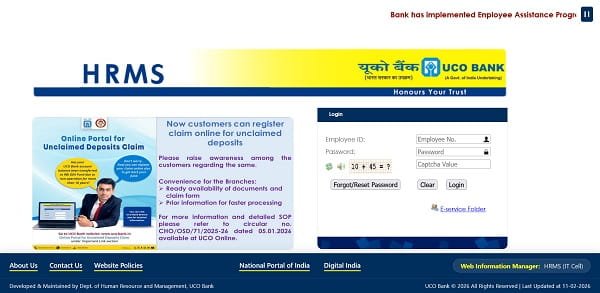
Step 2: On the homepage, click the Login button located in the top right corner of the page.
Step 3: Enter your Employee ID in the User ID field. Your Employee ID is the unique identification number assigned to you by UCO Bank and provided during onboarding.
Step 4: Enter your Password — the password you set during account activation or after your last password reset.
Step 5: Enter the Captcha code displayed on the screen exactly as shown.
Step 6: Click the Login button to proceed to your personalised HRMS dashboard.
First-Time Registration: UCO HRMS login credentials are not automatically created. New employees must register by submitting their employee details — Employee Number, full name, date of joining, branch, department, and registered mobile number — to the bank’s designated HRMS registration email address. After processing, login credentials are sent to your official email and registered mobile. Contact your branch manager or HR officer for the current registration email address.
UCO HRMS+ Mobile App Login: Download UCO HRMS+ from the Google Play Store or Apple App Store. Open the app and select your preferred language. Enter your Employee ID and Password to login. The app provides access to salary slips, leave management, tax information, and pensioner services from your smartphone.
Forgot Password: Click the “Forgot Password” link on the login page and follow the verification steps using your registered email or mobile number to reset your password securely.
Key Features of UCO Bank HRMS
Salary Slip Download (Pay Stub): Employees access and download their monthly salary slips — referred to as “Pay Stubs” on the UCO HRMS platform — for any past month. The slip provides a complete breakdown of all earnings and all deductions with the net pay clearly stated.
Leave Management: Apply for all categories of leave online — Casual Leave, Privilege Leave, Sick Leave, and others. View your current leave balance for each category, track the status of submitted applications in real time, and review leave history for any period.
Tax Bill Submission: UCO HRMS uniquely provides an online Tax Bill Submission module. Employees submit tax-related bills including LFC (Leave Fare Concession) and LTC (Leave Travel Concession) reimbursement claims directly through the portal — fully eliminating the need to submit physical paper bills to the HR department.
Multilingual UCO HRMS+ App: The UCO HRMS+ app is available in multiple languages, allowing employees to choose their preferred regional language for the entire interface. This is an industry-leading feature among PSU bank HRMS systems and ensures usability for employees across India’s diverse linguistic regions — particularly beneficial for staff posted in regional offices and rural branches.
Pension Services for Retirees: Retired UCO Bank employees access their monthly pension slips, view TDS deductions on pension, and download pension-related financial documents directly from the HRMS portal or the UCO HRMS+ app. A dedicated Retiree Update Screen allows retired staff to update their personal information directly — a feature that was previously unavailable in the legacy GB module.
Ex-Gratia and Compassionate Appointment: UCO HRMS includes links to ex-gratia benefit applications for retired employees and compassionate appointment access for eligible family members — a thoughtful inclusion that addresses post-retirement financial welfare.
Employee Folder and Document Download: A dedicated Downloads section within the portal contains all standard bank HR forms in one place, eliminating the need to visit branches or HR departments for form collection.
Leader Announcements: The portal includes a curated section for latest announcements from bank leadership — keeping employees informed about key business updates, policy changes, and strategic directions directly within their HR dashboard.
PF Account Access: Employees check their Provident Fund account balance and transaction history directly through the HRMS portal.
Benefits of UCO Bank HRMS
Most Inclusive Bank HRMS in India: UCO HRMS+ is the only PSU bank mobile HR app that is multilingual, available on both Android and iOS, and fully accessible to both serving and retired employees — making it the most inclusive bank HRMS platform nationally.
Zero Paper HR Transactions: From salary slips to LFC bill submissions, leave applications to tax declarations, every HR function is available online — reducing paper dependency completely.
Convenience for Pensioners: The UCO HRMS+ app and web portal ensure retired employees are not left out of digital HR access. Pension slips, tax details, personal information updates, and ex-gratia benefit links are all available without needing to visit a branch.
Language Accessibility: The multilingual app removes the language barrier for employees who are more comfortable in regional languages, improving portal adoption across diverse employee populations.
Comprehensive Ex-Gratia Support: Unlike most bank HRMS systems, UCO HRMS explicitly provides ex-gratia and compassionate appointment access — directly addressing the financial welfare of retired staff and their families.
Anytime, Anywhere Access: With a fully functional mobile app on both major platforms, employees access payroll and HR data 24/7 regardless of whether they are in the office or working remotely.
Frequently Asked Questions
Q: What is the login URL for UCO Bank HRMS?
A: The official portal is hrms.ucoonline.in. Use your Employee ID, Password, and Captcha to login from any desktop browser.
Q: What is UCO HRMS+ and is it available for iPhone users?
A: UCO HRMS+ is UCO Bank’s official mobile HR app. It is available on both Google Play Store (Android) and Apple App Store (iOS) — so yes, iPhone users can download and use it fully.
Q: Does UCO HRMS support multiple languages?
A: Yes. UCO HRMS+ is available in multiple regional languages. After downloading the app, employees select their preferred language from the available options — a feature unique among PSU bank HRMS apps in India.
Q: Can retired UCO Bank employees use the HRMS portal?
A: Yes. Retired employees access pension slips, tax details, and personal information updates through both the web portal and the UCO HRMS+ app. The Retiree Update Screen allows personal data updates directly through the portal.
Q: How do I register for UCO Bank HRMS?
A: Email your employee details (Employee Number, name, date of joining, branch, department, and mobile number) to the bank’s HRMS registration email. Credentials are sent to your official email after processing. Contact your branch manager for the current registration email address.
Q: What is the Ex-Gratia feature on UCO HRMS?
A: It is a dedicated module providing retired UCO Bank employees access to ex-gratia benefit applications and links for compassionate appointment — supporting the post-retirement financial welfare of employees and their dependent family members.