Indian Bank is one of India’s most respected and historically significant public sector banks, founded in 1907 in Chennai. With a strong presence across South India and a growing national network, Indian Bank serves millions of customers and employs a large workforce across all states. Managing this workforce digitally and efficiently is the responsibility of HR Connect — Indian Bank’s official HRMS platform accessible at hrconnect.indianbank.in. Built on the powerful PeopleSoft framework by Oracle and integrated with Active Directory (AD) for enterprise-grade secure login, HR Connect is a comprehensive system that serves both active Indian Bank employees and retired staff — including all employees from the former Allahabad Bank following the 2020 merger.
What Is Indian Bank HR Connect?
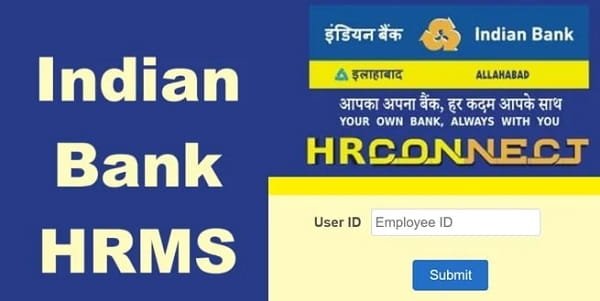
HR Connect (also referred to as HRCONNECT) is the official Human Resource Management System of Indian Bank. It operates at hrconnect.indianbank.in and is also accessible at the alternate URL staffportal.indianbank.co.in. The system is built on Oracle PeopleSoft — one of the most robust enterprise HR platforms used globally — and uses Active Directory (AD) integration for authentication, meaning your HRMS login credentials are tied to the bank’s overall network and system access credentials. This provides a single, secure sign-on experience across multiple internal banking systems.
Following the merger of Allahabad Bank into Indian Bank in April 2020, all former Allahabad Bank employees were migrated to HR Connect. Today the system serves the combined, significantly expanded Indian Bank workforce, with their complete pre-merger service records accessible through the same platform.
How to Login to Indian Bank HRMS
Step 1: Open Google Chrome on your desktop and navigate to hrconnect.indianbank.in. You can also access it via the alternate URL staffportal.indianbank.co.in.
Step 2: On the login page, enter your AD User ID — your Active Directory username assigned by the bank’s IT department. This is typically formatted as your employee code or bank email ID prefix. For most employees, this is the same credential used to log into the bank’s internal computer systems.
Step 3: Enter your AD Password — the Active Directory password linked to your bank credentials. If this is your first login or you have recently changed your AD password, use the most recent password set through the bank’s IT system.
Step 4: Enter the Captcha code shown on screen.
Step 5: Complete Two-Factor Authentication. An OTP is sent to your registered mobile number. Enter the OTP and click Submit to verify your identity.
Step 6: Click Login to access your HR Connect dashboard, which displays a summary of your leave balance, recent salary information, pending appraisal tasks, and quick access to all HR modules.
Access Note: HR Connect requires a secure network connection. It is primarily accessed through the bank’s internal network. For remote access from home, contact your IT department for VPN credentials or use the IndOASIS mobile app which provides authorised remote access to core HRMS features.
Forgot Password / Locked Account: AD password resets are managed by the bank’s IT department and cannot be done independently through the portal. Contact the HR helpdesk at the Corporate Office, HRM Department, Indian Bank, Chennai, or raise a support ticket through your branch’s IT officer.
Key Features of Indian Bank HRMS
Digital Salary Slips: Employees access and download monthly salary slips for any past month through the Payroll module of HR Connect. The payslip shows all earnings — basic pay, dearness allowance, house rent allowance, special allowance, and other components — alongside all deductions including NPS or PF contribution, group insurance, professional tax, income tax deducted at source, and loan installments. Annual salary statements are also available.
Form 16 Download: Form 16 — the TDS certificate for the financial year — is accessible directly from the Tax Documents section of HR Connect. Employees select the relevant financial year and download the PDF without needing to request it from the Accounts department.
Leave Management: The portal provides a complete digital leave workflow. Employees apply for Casual Leave, Privilege Leave, Sick Leave, and other applicable leave categories online. Applications are digitally routed to the reporting authority. Leave balance is visible before submitting and application status — pending, approved, rejected — is tracked in real time throughout the process.
Staff Loan Tracking: Indian Bank employees access detailed information on all sanctioned staff loans — housing loan, vehicle loan, personal loan, and education loan — including outstanding principal balance, interest rate details, EMI amount, and projected loan closure date. This feature provides complete visibility into personal loan obligations without visiting the loan processing branch.
Income Tax Calculation: The HRMS includes a tax detail and income tax calculation section, allowing employees to review their projected TDS for the year, declared investments, and tax liability under the applicable regime — useful for planning tax-saving declarations.
Performance Appraisal: Annual appraisal forms are initiated, completed, and tracked entirely through HR Connect. The digital PAF process covers self-appraisal submission, reporting officer assessment, reviewing officer rating, and final acceptance — all visible and auditable on the system.
Service Records: The system maintains a complete digital service book for each employee — appointment date, posting history, all transfers with order numbers and dates, increment history, and promotion records. Pre-merger Allahabad Bank service records are also integrated for alumni employees.
IndOASIS Mobile App Integration: Core HRMS features including salary slip viewing and leave management are accessible through the IndOASIS mobile app — Indian Bank’s official application for both customers and staff. Employees access the Staff Portal or HRMS section within IndOASIS for mobile HR self-service.
Benefits of Indian Bank HRMS
PeopleSoft Reliability: Built on Oracle PeopleSoft — a globally proven enterprise HR platform — HR Connect provides the stability, scalability, and feature depth required to serve a large merged workforce reliably.
Allahabad Bank Continuity: The complete migration of Allahabad Bank service records into HR Connect means former Allahabad Bank employees lose nothing in terms of historical payroll data, service history, and pension entitlements. Everything is accessible through the same portal seamlessly.
Secure AD-Integrated Login: Active Directory integration means employees do not need to remember a separate set of credentials — their existing bank network login is used, reducing password fatigue while maintaining high security standards.
Mobile Convenience via IndOASIS: The IndOASIS app means employees are not dependent on desktop access for urgent HR queries — salary slips and leave management are available on their smartphone from anywhere.
Transparent Loan Monitoring: The detailed staff loan tracking feature gives employees complete financial visibility over their bank loans, helping with personal financial planning without requiring branch visits or calls to the loan department.
Comprehensive Post-Merger Platform: Serving the combined workforce of Indian Bank and former Allahabad Bank, HR Connect is a unified HR environment that ensures consistent service for all employees regardless of their original bank of appointment.
Frequently Asked Questions
Q: What is Indian Bank HR Connect?
A: HR Connect (HRCONNECT) is the official PeopleSoft-based HRMS of Indian Bank at hrconnect.indianbank.in. It uses Active Directory login with OTP-based two-factor authentication and serves Indian Bank employees including former Allahabad Bank staff after the 2020 merger.
Q: What is the login User ID for Indian Bank HRMS?
A: Your AD User ID — the Active Directory username assigned by Indian Bank’s IT department — is used as the login ID. This is typically your employee code or official bank email prefix.
Q: How do I access Indian Bank HRMS from home?
A: HR Connect requires a secure connection. Use the IndOASIS mobile app for authorised remote access to core HR services, or contact your branch IT officer for VPN access to the full portal.
Q: Does HR Connect cover Allahabad Bank employees?
A: Yes. All former Allahabad Bank employees were migrated to Indian Bank HR Connect following the April 2020 merger. Their pre-merger service records and salary history are accessible through the same platform.
Q: How do I reset my Indian Bank HRMS password?
A: AD password resets require IT department involvement and cannot be done self-service through the portal. Contact the HRM Department at Indian Bank Corporate Office, Chennai, or raise a ticket through your branch IT officer.
Q: What is the IndOASIS app?
A: IndOASIS is Indian Bank’s official mobile application for both customers and staff. Employees access HR Connect features — salary slips and leave management — through the Staff Portal or HRMS icon within the app on Android and iOS.