You can check whether a bike’s insurance is active without creating an account or signing in. The quickest way is to use the vehicle registration number on the government’s Vahan service, or to send a text message to the official vehicle information number. Insurers also let you look up a policy with just a policy number or registration number and a one-time password. Here is how each option works, along with what to keep ready and what to watch out for. Government portals and insurer websites change their layouts from time to time, so follow the on-screen prompts if the steps look slightly different.
What You Need Before You Start
- The bike’s registration number, exactly as on the registration certificate.
- Your policy number, if you have it, which helps with insurer-side checks.
- The mobile number linked to the policy or vehicle, for OTP-based options.
- Your date of birth or chassis number, which some services ask for as verification.
Method 1: Check on the Vahan Portal
Vahan is the Ministry of Road Transport and Highways’ vehicle records service, and it displays basic details about a registered vehicle, including insurance information.
- Open the official vehicle information service on the parivahan.gov.in website, ideally by typing the address yourself.
- Look for the option to check or know your vehicle details.
- Enter the registration number and complete the captcha, adding the chassis or engine digits if asked.
- Submit, and the page shows the vehicle’s details, including insurance validity where available.
This method needs no login, and it works for any registered vehicle. The data depends on what the insurer has updated, so a very recent renewal may take a short time to appear.
Method 2: Send an SMS
Many states and the central service allow you to receive vehicle details by text message. The usual format is to type the word VAHAN, a space and the registration number, and send it to the official number published on the Parivahan site. A reply with registration and insurance details typically arrives shortly. Check the official site for the current number, since services can change, and never use a number from an unverified source.
Method 3: Use the Insurer’s Website With the Policy Number
Most insurers offer a policy status or “know your policy” page that does not require a password.
- Open the insurer’s official website and find the policy status or renewal section.
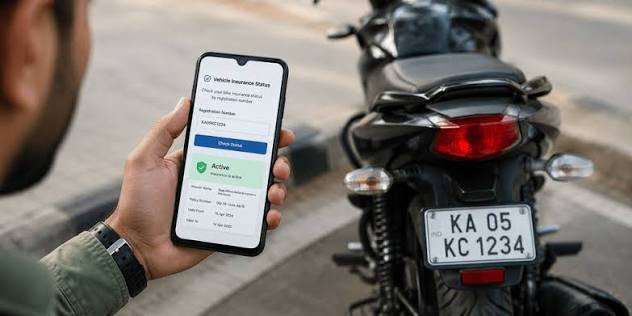
- Enter your policy number, or registration number, along with your date of birth or registered mobile number.
- Verify with an OTP sent to your registered phone.
- View the policy status, validity dates and renewal options.
This is a good way to see the exact start and end dates and the type of cover, and you can often download a copy of the policy document.
Method 4: Use the mParivahan App
The mParivahan mobile app lets you search for a vehicle by registration number and view its details, including insurance validity. Some features within the app may ask you to register, but the basic vehicle search often works without full sign-in. Download it only from the official app store listing published by the government.
Method 5: Check Through the Insurance Information Bureau
The Insurance Information Bureau of India maintains a database of insurance data. Its public services may allow you to look up motor insurance details using the vehicle number. Availability and format can change, so check the official site for the current options.
What the Status Page Usually Shows
- Name of the insurance company.
- Policy number.
- Policy start and expiry dates.
- Type of cover, such as third-party or comprehensive.
- Whether the policy is currently active.
If the details are missing or look wrong, the insurer may not have updated the record yet, or the registration number may have been entered incorrectly.
If Your Insurance Has Expired
- Renew right away. Riding without valid insurance is an offence and could leave you paying for any third-party damage personally.
- Renewing after a lapse may lead to the loss of No Claim Bonus, and the insurer may ask for an inspection of the bike.
- Compare renewal quotes online, and pick comprehensive cover if the bike’s value justifies it.
- Keep a digital copy of the new policy on your phone.
Tips for Avoiding Problems
- Use only official government and insurer websites, and type the address directly instead of clicking links in messages.
- Never share OTPs, passwords or card details with anyone claiming to help you check insurance.
- Make sure the registration number is entered without spaces or typos.
- If you bought a second-hand bike, check that the insurance is transferred to your name.
- Set a reminder a few weeks before expiry to renew in time.
- Save your policy in a phone folder or cloud storage for quick access during a traffic check.
Frequently Asked Questions
Q1. Can I check bike insurance status without logging in?
Yes. You can use the Vahan service with the registration number, send an SMS, or use an insurer’s policy status page with an OTP.
Q2. What do I need to check insurance status?
Mainly the bike’s registration number. Some services also ask for a policy number, date of birth or chassis digits.
Q3. Is checking insurance on Vahan free?
Basic vehicle details on the official portal are generally available at no charge.
Q4. Why does the portal show no insurance details?
The insurer might not have updated the record, or the number may have been entered incorrectly. Contact your insurer to confirm.
Q5. Can I check someone else’s bike insurance?
Public vehicle information can often be viewed with the registration number, which is useful when buying a second-hand bike. Use the information responsibly.
Q6. What should I do if my policy has expired?
Renew it as soon as possible, since riding without valid insurance is against the law and risky.