The State Bank of India is not just India’s largest public sector bank — it is one of the largest employers in the entire country, with over 2.5 lakh active employees serving across every state, union territory, and 32 countries globally. Supporting this enormous workforce requires a world-class digital HR infrastructure. That infrastructure is SBI HRMS — accessible at hrms.sbi.bank.in — a comprehensive Human Resource Management System that centralises payroll, leave, medical benefits, pension, tax management, and all employee self-service functions into one secure, integrated platform.
What Is SBI HRMS?
SBI HRMS is the official Human Resource Management System of the State Bank of India. It operates under the bank’s secure .bank.in domain — a banking-grade domain that provides higher trust and security than a standard .com or .in website. The portal serves both active employees and the bank’s millions of retired pensioners. A separate pensioner-specific section is also accessible through sbi.co.in/web/pensioners. In 2026, SBI HRMS received significant upgrades — including mandatory device-bound two-factor authentication for the MyHRMS mobile app and a newly introduced automated Tax Projection Tool to help employees make informed tax regime decisions.
How to Login to SBI HRMS
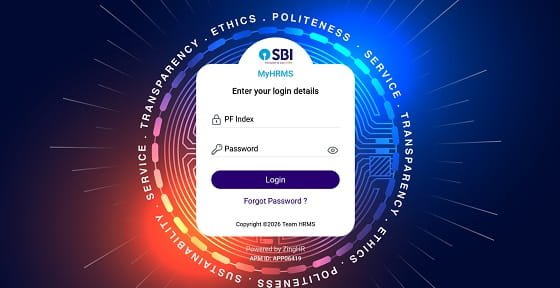
Step 1: Open Google Chrome or Microsoft Edge and navigate to hrms.sbi.bank.in.
Step 2: On the login page, enter your 7-digit PF Index Number as your User ID. This unique identifier is different from your account number or employee number — it is the PF Index allotted by the bank’s HR records system.
Step 3: Enter your ADS Password — the Active Directory Services password linked to your SBI network credentials. This is the same password used for logging into other SBI internal systems.
Step 4: Enter the Captcha code as shown on the screen.
Step 5: Complete the mandatory OTP (Two-Factor Authentication). An OTP is sent to your registered mobile number. Enter the OTP within the validity period and click Submit.
Step 6: Click Login to access your personalised SBI HRMS dashboard.
Forgot Password: Use the Forgot Password link on the login page, or reset your ADS password through the SBI intranet ADS portal. Ensure your registered mobile number is updated in the system — if it has changed, contact your branch’s CDO-15 records team or Circle HRMS administrator before attempting a reset.
MyHRMS App Login: For mobile access, download the MyHRMS app (version 10.1 or above) from Google Play Store or Apple App Store. After installation, the app must be registered to your specific device (Device Binding). Once bound, subsequent logins are secured using an MPIN — a 6-digit personal identification number set by you.
Key Features of SBI HRMS
Salary Slip and Annual Pay Statement: Download monthly salary slips for any past month. Annual salary statements are also available for the full financial year, useful for loan applications, tax filing, and income declarations.
Form 16 Download: Form 16 (TDS certificate) for each financial year is available directly through the HRMS portal, eliminating the need to request it from the Accounts department.
Tax Projection Tool (2026 Upgrade): This is one of the most important 2026 additions to SBI HRMS. The automated Tax Projection Tool calculates your income tax liability under both the old and new tax regimes, side by side, based on your actual salary and declared investments. It helps employees make an informed decision before submitting their final tax declaration for the year.
Leave Management: Apply for Leave on Account of Personal (LAP), Casual Leave, Sick Leave, and Special Leave online. The system also includes a Leave Encashment calculator to help plan Leave Travel Concession (LTC) or Leave Fare Concession (LFC) benefits efficiently.
SBI Health Assist — Mediclaim: The HRMS portal is the gateway for submitting and tracking SBI Health Assist (the bank’s group mediclaim insurance) premium renewals, policy details, and claim tracking.
Pension Services: Retired SBI employees access their monthly pension slips, pension arrears calculation sheets, and annual pension statements. The portal also supports digital submission of the Video Life Certificate (VLC) — pensioners can submit their annual life proof through a smartphone camera, removing the need to visit a branch in person.
HR Analytics for Controllers: Branch Controllers and Circle HR administrators access real-time staff strength data, deployment reports, and vacancy analytics through the HRMS dashboard for manpower planning purposes.
Performance Appraisal: Annual performance reviews are initiated and completed through the portal with complete traceability from self-assessment to final rating.
Benefits of SBI HRMS
Complete Lifecycle Management: SBI HRMS covers every stage of the employee journey — from day one onboarding through service years to post-retirement pension — in a single, unified system.
Tax Savings Made Simple: The 2026 Tax Projection Tool removes guesswork from regime selection, potentially saving employees thousands of rupees annually by helping them choose the more beneficial tax structure.
Pensioner Convenience: The Video Life Certificate feature is transformative for elderly SBI pensioners, especially those in remote areas or with limited mobility. Submitting a life certificate via smartphone from home replaces the traditional requirement of physically visiting a bank branch.
Bank-Grade Security: The .bank.in domain, ADS password system, mandatory OTP 2FA, and device binding on the mobile app provide multiple layers of security — significantly superior to typical government portal logins.
Mobile-First Flexibility: The MyHRMS app gives employees full access to all core HR services from their smartphones. Whether checking leave balance during a holiday or downloading a salary slip for a bank loan application, everything is available anytime, anywhere.
Unified Platform for Millions: With 2.5 lakh+ active employees and millions of pensioners all on one system, SBI HRMS ensures uniform service quality regardless of the employee’s posting location — whether a metro branch or a remote rural outpost.
Frequently Asked Questions
Q: What is the login URL for SBI HRMS?
A: The official portal is hrms.sbi.bank.in. Use your 7-digit PF Index Number as User ID and your ADS Password. OTP two-factor authentication is mandatory from 2026.
Q: What is the MyHRMS app and how do I set it up?
A: MyHRMS is SBI’s official mobile HRMS app (v10.1+) available on Android and iOS. After download, Device Binding registers the app to your specific phone. You then set an MPIN for all future logins.
Q: What is the Tax Projection Tool on SBI HRMS 2026?
A: It is an automated calculator that shows your tax liability under both the old and new tax regimes simultaneously, helping you choose the more beneficial option before submitting your annual tax declaration.
Q: How do SBI pensioners submit their life certificate?
A: Through the Video Life Certificate (VLC) feature on SBI HRMS or the pensioner section at sbi.co.in/web/pensioners, pensioners record and submit their life proof digitally via smartphone — no branch visit required.
Q: What is the ADS password for SBI HRMS?
A: The ADS (Active Directory Services) password is the network login credential used across SBI’s internal systems. Contact your branch’s IT administrator or CDO-15 records team if you need to reset it.
Q: Can I download Form 16 from SBI HRMS?
A: Yes. Form 16 for each completed financial year is available under the Tax Documents section of SBI HRMS. Select the financial year and download the PDF directly.