Punjab National Bank is one of India’s most respected and oldest public sector banks, with a history spanning more than 130 years. Managing a large workforce across thousands of branches and offices throughout the country requires a powerful, reliable, and modern HR management system. Punjab National Bank meets this need through PNB HRMS Parivar 2.0 — its official Human Resource Management System available at hrms.pnb.bank.in. Whether you are a newly joined bank officer, a senior-level manager, or a retired PNB pensioner, this portal is your one-stop destination for all payroll, leave, performance, and HR self-service needs.
What Is PNB HRMS Parivar 2.0?
PNB HRMS Parivar 2.0 is the upgraded version of the original PNB Parivar system, which was first introduced in 2006 primarily for centralised payroll processing. Over the years, it has evolved into a full-fledged Human Resource Management System covering the complete employee lifecycle — from joining formalities to retirement and pension services. The system also covers employees who joined PNB following the 2020 merger of Oriental Bank of Commerce and United Bank of India into Punjab National Bank, making it one of the largest bank HRMS systems in India by active user count.
How to Login to PNB HRMS Parivar 2.0
Logging into PNB HRMS is a straightforward process. Follow the steps below to access your account.
Step 1: Open Google Chrome on your desktop or laptop and navigate to hrms.pnb.bank.in.
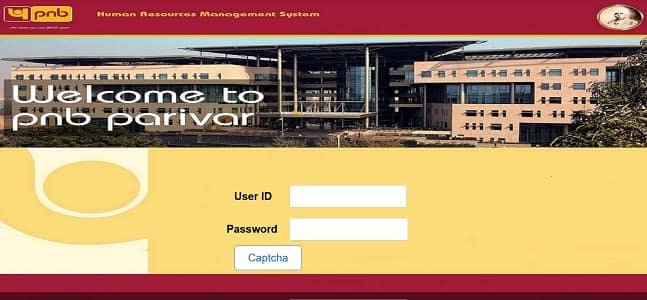
Step 2: On the homepage, locate the Login section. Enter your PF Number (Employee Provident Fund Number) as your User ID. This is a unique identifier assigned to every PNB employee and serves as the primary login credential.
Step 3: Enter your HRMS Password in the password field. The password is case-sensitive, so ensure Caps Lock is off before typing.
Step 4: Type the Captcha code exactly as shown on the screen.
Step 5: Complete the OTP (One-Time Password) verification. From 2026, OTP-based two-factor authentication is mandatory for all PNB HRMS logins. The OTP is delivered to your registered mobile number within seconds.
Step 6: Click the Login button to access your personalised HRMS dashboard.
Important Note: The PNB HRMS web portal (hrms.pnb.bank.in) is accessible only from within the PNB internal bank network. If you need to access HR services from home or while travelling, use the PNB Parivar 2.0 mobile app, available on both Google Play Store (Android) and Apple App Store (iOS). The app uses biometric login — fingerprint or Face ID — combined with device binding for secure remote access.
Forgot Password: If you forget your password, click the “Forgot Password” link on the login page. Follow the on-screen instructions to reset your password through your registered mobile number or email ID.
Key Features of PNB HRMS Parivar 2.0
PNB HRMS Parivar 2.0 is a feature-rich platform designed to simplify and digitise every aspect of employee HR management.
Salary Slip and Payroll Management: Employees can download monthly salary slips for any past period. The payroll module provides a detailed breakdown of all earnings including basic pay, dearness allowance, house rent allowance, and all applicable allowances. All deductions such as PF contribution, income tax, group insurance, and loan installments are clearly itemised.
Leave Management: Staff can apply for Casual Leave, Privilege Leave, Sick Leave, and other applicable leave categories entirely online. Leave applications are routed digitally to the reporting officer for approval. Employees can track the real-time status of their leave application — submitted, under review, approved, or rejected — and check their available leave balance for each category at any time.
Performance Appraisal (PAF): The Performance Appraisal Form module enables employees to complete their annual appraisal entirely online. The process covers self-assessment by the employee, reporting officer rating, reviewing officer feedback, and final assessment — all tracked digitally with no physical paper trail needed.
Allowance Claims: Employees submit claims for newspaper allowance, petrol allowance, cleansing materials, briefcase allowance, and other perquisites entirely through the HRMS portal. This eliminates the need to submit physical bills to the HR department.
Staff Loan Tracking: Track all staff loans — house loan, vehicle loan, personal loan — including the outstanding principal, interest, and monthly EMI schedule.
PNB Parivar 2.0 Mobile App: The official app provides biometric login, push notifications for leave approvals and policy changes, access to e-Circulars, and the SAATHI employee welfare module for benefit information.
Training (PNB UNIV): Training module integration connects to PNB UNIV — the bank’s internal learning platform — for RBI-mandated compliance courses and internal skill development programs.
Pension Services: Retired PNB employees access their monthly pension slips and life certificate submission status through the portal.
Benefits of PNB HRMS Parivar 2.0
Complete Paperless HR Operations: From leave applications to allowance claims and appraisal forms, every HR transaction is entirely digital. This saves significant time and reduces the risk of documents getting misplaced.
24/7 Access Through Mobile App: Even when branches are closed, the PNB Parivar 2.0 app allows employees to check their salary slips, apply for leave, and stay updated with bank circulars from anywhere at any time.
Transparent Performance Tracking: Employees see exactly where their PAF stands in the review chain — no ambiguity about whether appraisals have been submitted or reviewed.
Post-Merger Integration: OBC and United Bank of India employees have full access to the same HRMS services, ensuring uniform service delivery across the merged workforce.
Enhanced Security with Device Binding: With 2FA OTP and app-level device binding, employee data is protected against unauthorised access even if login credentials are compromised.
Instant Notifications: Push alerts for leave approvals, salary credit, circular updates, and HR announcements keep employees informed in real time.
Frequently Asked Questions
Q: What is the User ID for PNB HRMS login?
A: Your PF Number (Provident Fund Number) is used as the User ID on PNB HRMS Parivar 2.0.
Q: Can I access PNB HRMS from outside the office?
A: The web portal is accessible only on the PNB internal network. For home access, use the PNB Parivar 2.0 mobile app which provides authorised remote access with biometric and device-bound security.
Q: What is the SAATHI module on PNB HRMS?
A: SAATHI is a dedicated module inside the PNB Parivar 2.0 app that provides employees and their families with a complete guide to available welfare benefits and schemes offered by the bank.
Q: Are OBC and United Bank of India employees on PNB HRMS?
A: Yes. Following the 2020 merger, all employees of Oriental Bank of Commerce and United Bank of India have been integrated into PNB HRMS Parivar 2.0.
Q: How do I reset my PNB HRMS password?
A: Click the “Forgot Password” link on the hrms.pnb.bank.in login page and follow the mobile or email verification steps to set a new password.
Q: What is PNB UNIV?
A: PNB UNIV is Punjab National Bank’s internal digital learning platform integrated with HRMS, providing access to RBI-mandated courses and internal training programs.