Central Bank of India is one of the oldest nationalized banks in the country, established in 1911. It holds a unique distinction of being the first truly Indian commercial bank — fully owned and managed by Indian citizens at the time of its founding. Today, with thousands of employees working across branches in every state, Central Bank of India operates a dedicated digital HR management system called Cent Swa Darpan — the bank’s official HRMS portal — to manage all payroll, leave, pension, and employee self-service functions in one secure, centralised platform.
What Is Cent Swa Darpan?
Cent Swa Darpan is the official Human Resource Management System of Central Bank of India, accessible at hrms.centralbank.bank.in. The name is a meaningful one — “Cent” is the bank’s brand identity prefix, while “Swa Darpan” translates to “self-mirror” in Sanskrit, reflecting the portal’s purpose of giving every employee a clear, transparent, and honest view of their own HR records, salary data, and service history. The portal operates on the bank’s secure .bank.in domain and is protected by two-factor authentication (2FA), ensuring that all employee data remains safe and accessible only to authorised users.
The system serves both active employees across all cadres and retired Central Bank pensioners, making it a comprehensive HR platform covering the full employee lifecycle from joining to post-retirement.
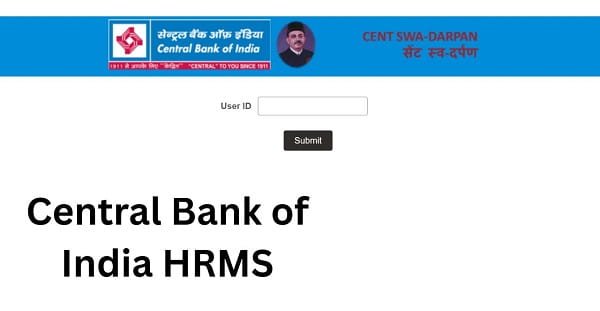
How to Login to Central Bank of India HRMS
Accessing your Central Bank HRMS account is a simple process. Follow the steps below carefully.
Step 1: Open Google Chrome or any modern browser and navigate to hrms.centralbank.bank.in.
Step 2: On the login page, enter your Employee ID or User ID. This credential is issued to you by your branch HR officer or the bank’s HR Management Department at the time of onboarding. New employees must contact their branch HR to receive their login credentials — self-registration is not available on this portal.
Step 3: Enter your Password in the password field. Your initial password is set by the HR department and you are required to change it to a personal, secure password on your first login.
Step 4: Complete the Two-Factor Authentication (2FA) step. An OTP is sent to your registered mobile number. Enter the OTP within the stipulated time limit and click Verify.
Step 5: Click the Login / Submit button to access your personalised Cent Swa Darpan dashboard.
Access Note: Cent Swa Darpan is primarily accessed from the bank’s internal network. If you are trying to access the portal from outside the office premises and face connectivity issues, contact your branch IT support or HR for VPN access instructions.
Forgot Password: If you forget your password, click the “Forgot Password” option on the login page. Enter your registered User ID and follow the identity verification steps using your registered mobile number or email to reset it. For cases where the registered mobile number has changed or is inactive, contact the bank’s HR department or nearest treasury office directly.
Key Features of Central Bank of India HRMS
Salary Slip Download: Employees can access and download their monthly salary slips directly from the Cent Swa Darpan portal. Each payslip provides a comprehensive breakdown of all earnings — basic pay, dearness allowance, house rent allowance, city compensatory allowance, and all other applicable allowances — alongside a complete list of deductions including PF contribution, group insurance installments, income tax deducted at source, and loan EMI recoveries. The net pay is clearly reflected at the bottom of the slip.
Leave Management: The portal provides a fully digital leave management workflow. Employees apply for Casual Leave, Privilege Leave, Sick Leave, and other applicable leave types directly through the portal. Applications are automatically routed to the reporting authority for digital approval or rejection. Employees track the real-time status of every application and check current leave balance for each category before applying.
Pension Services: Retired Central Bank of India employees access their post-retirement services through the same Cent Swa Darpan portal using separate pensioner credentials. Services include monthly pension slip download, pension credit history, arrears calculation details, and life certificate submission tracking.
Tax Documents and Form 16: The portal provides access to Form 16 — the annual TDS certificate — for each completed financial year. Employees download Form 16 directly without needing to make a request to the Accounts department, significantly simplifying income tax return filing.
Staff Loan Tracking: Employees view the complete details of all sanctioned staff loans including home loans, vehicle loans, and personal loans — outstanding principal balance, interest accrued, and the EMI schedule for future installments.
Employee Profile Management: Employees view and update personal information such as contact details, nominee information, and bank account details through the self-service section of the portal.
HR Announcements and Circulars: Important bank circulars, policy updates, and HR announcements are published through the portal, ensuring all employees receive official communications directly on their HRMS dashboard.
Performance Appraisal: Annual performance review forms are accessed and submitted digitally through Cent Swa Darpan, with complete visibility of where the appraisal stands in the review chain at any given point.
Benefits of Central Bank of India HRMS
Single Platform for All HR Needs: Whether it is downloading a salary slip, applying for leave, checking a loan balance, or submitting a performance appraisal — Cent Swa Darpan brings all these functions under one login. Employees do not need to visit multiple departments or offices for routine HR tasks.
Enhanced Data Security with 2FA: The mandatory two-factor authentication on every login ensures that sensitive payroll and personal data is protected. Even if a password is compromised, the OTP verification step prevents unauthorised access.
Transparent Service Records: Employees get a clear, real-time view of their complete service history, salary records, leave account, and loan details — removing the information gap that often exists between employees and the HR department.
Convenience for Pensioners: Retired Central Bank staff access all their post-retirement financial information including pension slips, arrears details, and life certificate status directly from the portal, reducing their dependence on branch visits.
Fully Paperless Operations: Leave applications, performance reviews, form submissions, and salary slip downloads are all handled digitally — reducing paper usage and processing delays across all HR workflows.
Accessible Across All Cadres: Cent Swa Darpan is designed for employees across all cadres — from clerks and officers to senior managers and retired staff — with role-appropriate access to the relevant modules.
Frequently Asked Questions
Q: What is Cent Swa Darpan?
A: Cent Swa Darpan is the official HRMS portal of Central Bank of India available at hrms.centralbank.bank.in. The name means “self-mirror” — reflecting the portal’s role of giving employees full visibility into their own HR and payroll records. The system is secured with mandatory Two-Factor Authentication (2FA).
Q: How do I get my Central Bank HRMS login credentials?
A: Credentials are issued centrally — self-registration is not available. Your Employee ID and initial password are provided by your branch HR officer. Contact your branch head or the HR Management Department if you have not received them.
Q: Can I access Cent Swa Darpan from home?
A: The portal is primarily accessed on the bank’s internal network. For home access, contact your branch IT support for VPN instructions.
Q: Can retired Central Bank employees use the HRMS portal?
A: Yes. Retired employees access pension slips, pension credit history, arrears details, and life certificate submission status through the pensioner section of Cent Swa Darpan using pensioner credentials.
Q: What is the 2FA on Central Bank HRMS?
A: Two-Factor Authentication sends an OTP to your registered mobile number each time you login, adding a critical second layer of security beyond just your password.
Q: How do I download Form 16 from Central Bank HRMS?
A: Login to Cent Swa Darpan → navigate to Tax Documents → select Form 16 → choose the relevant financial year → download the PDF.