Bank of India is one of India’s most respected and long-standing public sector banks, founded in 1906 in Mumbai. With over a century of banking experience and a workforce spread across thousands of branches throughout India and international offices in more than 20 countries, Bank of India has consistently invested in modernising its internal systems. One of the most important of these systems is the Bank of India HRMS — an Oracle PeopleSoft-based Human Resource Management System accessible at hrms.bankofindia.co.in — which serves as the centralised digital platform for all payroll, leave, pension, provident fund, attendance, and employee self-service functions for BOI staff and retirees.
What Is Bank of India HRMS?
Bank of India HRMS is the official digital HR management platform of Bank of India. It is built on Oracle PeopleSoft — one of the world’s most widely used and trusted enterprise HR platforms — and is officially recommended to be accessed using Microsoft Edge for the best experience. The system stands out among PSU bank HRMS portals for one particularly notable feature: it stores and makes available salary records going all the way back to the employee’s year of joining — not just recent months. This means every Bank of India employee can access their complete salary history since the day they first joined the bank, making it an exceptionally comprehensive payroll archive.
How to Login to Bank of India HRMS
Logging into Bank of India HRMS is straightforward. Follow the steps below for smooth access.
Step 1: Open Microsoft Edge on your computer — this is the officially recommended browser for Bank of India HRMS due to the PeopleSoft interface’s compatibility requirements. While other browsers may partially work, Microsoft Edge provides the best and most reliable experience.
Step 2: Navigate to hrms.bankofindia.co.in in the browser address bar.
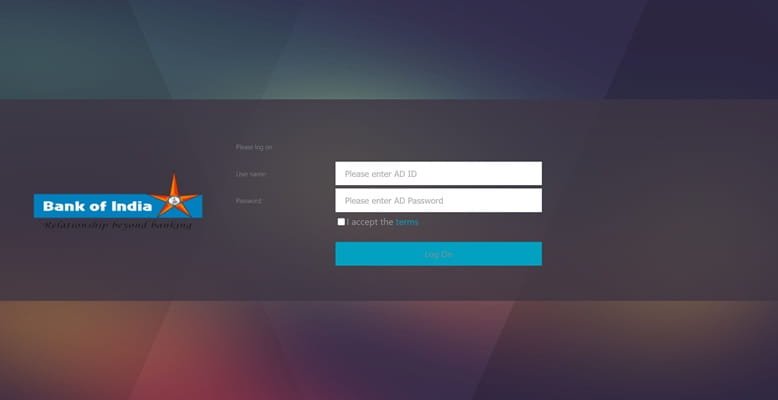
Step 3: The homepage displays a navigation menu on the right side of the screen. Locate the login section and enter your User ID — your unique employee identifier provided by the bank’s HR department during onboarding.
Step 4: Enter your Password in the password field. If this is your first login, use the temporary password communicated to you during account creation and change it immediately to a secure personal password.
Step 5: Click the Login / Sign In button. Ensure that cookies are enabled in your Microsoft Edge browser — the PeopleSoft system requires cookies to function correctly for the login session. If you face a login error related to cookies, go to your browser settings, enable cookies for the site, and try again.
Step 6: After successful login, your personalised HR dashboard opens. The right-side navigation menu allows you to browse all available modules. You can also mark frequently used pages as Favourites for faster access on future logins.
Registration Process: Bank of India HRMS does not support open self-registration. To register, send an email to feedback.boialumni@bankofindia.co.in with your employee details — full name, Employee ID, date of joining, department, branch, and registered mobile number. Once your registration request is processed, you will receive a confirmation email with your User ID and initial password.
Forgot Password: Click the Forgot Password link on the login page and follow the instructions to reset via your registered email or mobile number.
Key Features of Bank of India HRMS
Complete Salary History from Joining Year: This is the standout feature of BOI HRMS — unlike most bank portals that show only recent months, Bank of India HRMS stores and displays salary slips going back to the employee’s actual year of joining. Whether you joined the bank five years ago or twenty years ago, your complete salary archive is accessible at any time for any purpose.
Salary Slip Download via Self-Service: Employees navigate to the Main Menu → Self-Service → Payroll section to access their salary slips. Select the month and year, click Search, confirm with Yes, click Run Report, and download the generated slip from the provided link. The entire process takes just a few clicks and delivers a detailed PDF payslip covering all earnings and deductions.
Pension Details and Slip Access: Retired Bank of India employees access their pension-related information through the HRMS portal. Monthly pension slips, pension credit history, and arrears details are all available in the pensioner section after login with pensioner-specific credentials.
Leave Management: Employees apply for Casual Leave, Privilege Leave, Sick Leave, and other applicable leave types online. Applications are digitally forwarded to the reporting authority for approval. Leave balance across all categories is displayed before application, and real-time application status — pending, approved, or rejected — is tracked throughout.
Provident Fund (PF) Account Access: Employees check their current PF account balance and view a detailed transaction-level history of contributions — both employee and employer shares — and any withdrawals or transfers processed.
Holiday Calendar: The annual holiday calendar is accessible directly through the portal, listing all bank holidays applicable to the employee’s location, helping with leave planning throughout the year.
Reimbursement Claims: Employees submit food allowance and travel reimbursement claims digitally through the portal, eliminating the need for physical bill submission at branches.
Employee Profile Management: Personal contact details, nominee information, and dependent data can be viewed and updated through the self-service section of the HRMS.
HR Announcements and Notifications: Policy updates, circulars, and HR-related official communications are published through the portal dashboard, keeping all employees informed regardless of their posting location.
Benefits of Bank of India HRMS
Unmatched Salary Archive Depth: No other PSU bank HRMS offers salary history from the actual joining year. For long-serving Bank of India employees, this means access to decades of payroll records in one place — invaluable for pension calculations, loan applications requiring extended income proof, and retirement planning.
PeopleSoft Reliability: The Oracle PeopleSoft platform provides enterprise-grade stability and performance. The system is designed to handle a large user base simultaneously without performance degradation — essential for a bank with thousands of employees logging in daily.
Convenient Self-Registration via Email: While not a full self-service registration, the email-based registration process is straightforward and accessible to all employees, including retirees seeking access to alumni services.
Comprehensive Financial Visibility: From salary to PF balance to reimbursements, the HRMS consolidates all financial data related to the employment relationship in a single dashboard — reducing the need to contact multiple departments for different types of financial information.
Pensioner Inclusion: Retired Bank of India employees are not left behind — the portal serves both active and retired staff, ensuring continuity of HR service access even after retirement.
Paperless Leave and Reimbursement Workflows: Both leave management and reimbursement claims are fully digital, saving significant time and reducing administrative errors that occur in paper-based processes.
Microsoft Edge Optimisation: The recommendation to use Microsoft Edge ensures employees get the smoothest, most reliable interface experience with no rendering or functionality issues common in less compatible browsers.
Frequently Asked Questions
Q. What browser should I use for Bank of India HRMS?
Bank of India officially recommends using Microsoft Edge for the best HRMS experience. The PeopleSoft interface is optimised for Edge, and using other browsers may result in display or functionality issues.
Q. How far back can I access salary slips on BOI HRMS?
Bank of India HRMS stores salary records from your actual year of joining — meaning your complete salary history from day one of your bank career is available for download at any time.
Q. How do I register for Bank of India HRMS?
Send an email to feedback.boialumni@bankofindia.co.in with your employee details. After processing, you receive your User ID and initial password by email.
Q. What is the login URL for BOI HRMS?
The official portal is hrms.bankofindia.co.in — open it in Microsoft Edge for the best experience.
Q. Can pensioners access Bank of India HRMS?
Yes. Retired Bank of India employees access pension slips, credit history, and arrears information through the pensioner section of the HRMS portal using their pensioner credentials.
Q. Why does login fail even with correct credentials?
Ensure cookies are enabled in your Microsoft Edge browser — PeopleSoft requires cookies for session management. Also confirm you are using the correct User ID format. If the issue persists, use the Sign Out option, clear cookies, and attempt login again.