Canara Bank is one of India’s premier public sector banks — a financial institution with a legacy of over 120 years and a deep commitment to progressive banking. Headquartered in Bengaluru, Canara Bank operates thousands of branches across India, serving millions of customers and employing a large, diverse workforce. Following the merger of Syndicate Bank into Canara Bank in 2020, the bank’s workforce expanded significantly, making the need for a robust, centralised HR management system even more important. That system is Canara Bank HRMS — a modern, enterprise-grade platform using Microsoft Azure Active Directory Single Sign-On (SSO) for login, complemented by the CANARA HRMS mobile app for on-the-go HR access.
What Is Canara Bank HRMS?
Canara Bank HRMS is the official Human Resource Management System of Canara Bank. Unlike most PSU bank HRMS portals that use a standard username-password form, Canara Bank HRMS employs Microsoft Azure Active Directory (Azure AD) based Single Sign-On (SSO) — accessible at sso.canarabank.com — for employee authentication. This enterprise-grade SSO approach means employees use a single, unified bank credential to access the HRMS along with all other Canara Bank internal digital systems. It eliminates password duplication and provides a seamless, one-click login experience with Microsoft-grade security.
The bank also provides the CANARA HRMS mobile app — available on the Google Play Store — for employees who need HR access from their smartphones, particularly for leave management. Additionally, Canara Bank’s integrated digital learning platform CanDLE (Canara Digital Learning Environment) is connected to the HRMS, making it a truly holistic employee management ecosystem.
How to Login to Canara Bank HRMS
Step 1: Open Google Chrome or Microsoft Edge on your desktop and navigate to sso.canarabank.com/adfs/ls/ — this is Canara Bank’s official Azure AD-based SSO login portal.
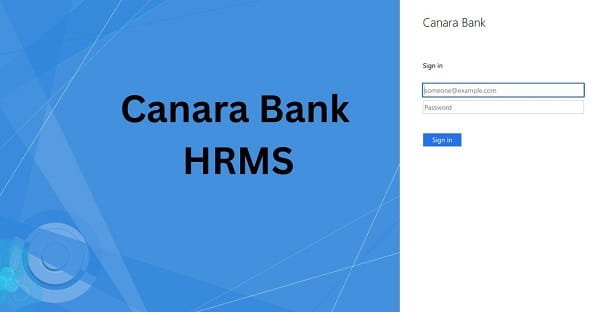
Step 2: On the SSO login page, enter your Canara Bank corporate email address or AD username — the official bank-issued identity credential assigned to you by the IT department when you joined.
Step 3: Enter your Active Directory Password — the password tied to your Canara Bank network account. This is the same credential you use to log into your office computer and other Canara Bank internal systems.
Step 4: If prompted, complete the Multi-Factor Authentication (MFA) step. Depending on your security configuration, this may involve an OTP sent to your registered mobile, an authenticator app approval, or another verification method.
Step 5: After successful SSO authentication, you are automatically redirected to your personalised Canara Bank HRMS dashboard. The dashboard displays your attendance summary, leave balance, pending payroll actions, and quick access links to all HR modules.
For New Employees: Your corporate email and AD credentials are set up by the bank’s IT department during onboarding. If you have not received your credentials or are facing SSO access issues, contact the IT helpdesk or your branch HR officer.
Forgot Password: Azure AD password resets for Canara Bank employees are managed through the bank’s IT self-service portal or by contacting the IT helpdesk. The HRMS portal itself does not have an independent password reset — all credential management is handled centrally through Azure AD.
CANARA HRMS App Login: Download the CANARA HRMS app from Google Play Store. Open the app and sign in using your Canara Bank AD credentials. The app is designed for leave management on mobile — submit leave applications, view approval status, and check leave balance from anywhere.
Key Features of Canara Bank HRMS
Azure AD SSO — Single Credential Access: The use of Microsoft Azure Active Directory means employees login to the HRMS with the same credentials used for all Canara Bank internal systems. No separate HRMS-specific password to remember — one secure identity credential provides access to everything. This significantly reduces password-related helpdesk calls and improves security across the board.
Salary Slip Download: After SSO login, employees navigate to the Payroll section to access and download their monthly salary slips. Each slip provides a comprehensive earnings breakdown — basic pay, dearness allowance, house rent allowance, special allowances, and all applicable components — along with itemised deductions including PF or NPS contributions, group insurance, professional tax, income tax, and loan EMIs.
Leave Management with Mobile App: Canara Bank HRMS provides a fully digital leave management system. Employees apply for all leave categories — Casual Leave, Privilege Leave, Medical Leave, and others — through the portal or the CANARA HRMS mobile app. Applications are routed to the reporting authority, approval or rejection notifications are received instantly, and leave balance is updated in real time.
CanDLE Training Integration: CanDLE (Canara Digital Learning Environment) is integrated within the HRMS ecosystem. Employees access RBI-mandated compliance training, internal banking courses, and professional development programs directly through their HRMS dashboard. Course completion status and certification tracking are maintained within the same platform.
Performance Appraisal: Annual performance reviews are initiated, completed, and tracked entirely online. The appraisal chain — self-assessment, reporting officer rating, reviewing officer feedback, and final acceptance — is fully digital with no paperwork required.
Tax Documents and Form 16: Form 16 for each financial year is available for download from the Tax Documents section of the portal. Annual income statements and TDS details are also accessible, simplifying income tax return filing.
Employee Self-Service: Employees update personal information, contact details, nominee data, and bank account details through the self-service section without visiting the HR department.
HR Announcements and Circulars: Bank-wide circulars and policy notifications are published through the HRMS dashboard, ensuring all employees — including those in regional offices and smaller branches — receive official communications promptly.
Syndicate Bank Employee Integration: Following the 2020 merger, all former Syndicate Bank employees are fully integrated into the Canara Bank HRMS platform, with their pre-merger service records accessible through the same system.
Benefits of Canara Bank HRMS
Enterprise-Grade Security Through Azure AD: Microsoft Azure Active Directory is the gold standard for enterprise identity management. By leveraging this technology, Canara Bank provides its employees with a level of login security that is significantly more robust than the traditional username-password approach used by most other bank HRMS systems.
Seamless Single Sign-On Experience: Employees log in once using their AD credentials and gain access to all Canara Bank internal systems including HRMS — no juggling of multiple passwords, no repeated logins throughout the workday. This seamless experience is a significant quality-of-life improvement for branch-level staff managing busy daily operations.
Mobile-First Leave Management: The CANARA HRMS app ensures that leave management is never tied to a desktop. Branch employees and field staff can apply for leave, check balance, and track approvals from their smartphones at any time — even outside working hours.
Learning and HR in One Ecosystem: The CanDLE integration means career development and HR management are connected. Completed training can directly influence appraisal outcomes, and mandatory compliance courses are tracked within the same platform as performance data.
Post-Merger Workforce Unity: The single HRMS platform covering both original Canara Bank employees and former Syndicate Bank staff ensures a unified HR experience — no differentiation in service quality or data accessibility based on the employee’s original bank.
Reduced IT Support Overhead: Azure AD SSO significantly reduces the volume of password-reset helpdesk calls — a common pain point for large organisations with multiple internal systems requiring separate credentials.
Frequently Asked Questions
Q: What is the login URL for Canara Bank HRMS?
A: Canara Bank HRMS uses Azure AD Single Sign-On at sso.canarabank.com/adfs/ls/. Use your Canara Bank corporate email or AD username with your Active Directory password to login.
Q: What is Azure AD SSO and why does Canara Bank use it?
A: Azure Active Directory SSO is Microsoft’s enterprise identity platform that allows one credential to access multiple systems securely. Canara Bank uses it so employees have a single, unified login for HRMS and all other internal banking systems — improving both security and convenience.
Q: Is there a Canara Bank HRMS mobile app?
A: Yes. The CANARA HRMS app is available on the Google Play Store for Android devices. It enables employees to apply for leave, track approval status, and check leave balance from their smartphones.
Q: What is CanDLE?
A: CanDLE is Canara Digital Learning Environment — the bank’s official digital learning platform integrated with HRMS. It provides access to RBI-mandated compliance courses and internal training programs, with completion tracked within the HR system.
Q: Does Canara Bank HRMS cover Syndicate Bank employees?
A: Yes. All former Syndicate Bank employees were integrated into Canara Bank HRMS following the April 2020 merger. Their pre-merger service records and payroll history are accessible through the same platform.
Q: How do I reset my Canara Bank HRMS password?
A: Password management is handled through Azure AD — not through the HRMS portal independently. Contact the Canara Bank IT helpdesk or use the bank’s AD self-service password reset portal. Your branch IT officer can also assist.